
इस Category में आपको Blogging Tips in Hindi, blogging kaise shuru kare, Google search console, WordPress blog, Blog post ideas, blogging meaning in hindi, Blogging kaise kare, Google discover seo, Traffic,tech Tips and Tricks in Hindi आदि के बारे में जानेगें |

सभी ब्लॉगर अपने ब्लॉग पोस्ट में Toc का इस्तेमाल करते हैं क्योंकि उन्हें पता है, कि Table of content User Experience में एक अच्छा Role Play करती है। इसकी मदद से Users पोस्ट के किसी भी हिस्से को आसानी से पढ़ सकते हैं। इससे लेख का Engagement टाइम तो बढ़ता ही है और Users को आर्टिकल पढने में कोई परेशानी नहीं होती है। इसके अलावा Google, आर्टिकल के Toc को Rich Snippet दिखाता है। इससे CTR भी बढ़ने के Chance बढ़ जाते हैं।
आज इस आर्टिकल में हम ब्लॉगर और WordPress पर Toc को Add करने के कुछ बढ़िया तरीकों, Customization और इसके फायदे के बारे में बताएँगे | इसके अलावा अभी 2023 में Blogger में Automatically Table of Contents Add करने का तरीका भी Discuss करेंगे।
Table of Contents को Add करने के तरीके अलग-अलग Platform के लिए अलग हो सकते हैं| इसीलिए आप किस प्लेटफार्म पर Blogging कर रहें हैं, उसके हिसाब से Steps फॉलो करें:-

Table of Contents क्या होती है- What is Toc
Toc एक List होती है, जिसमे आर्टिकल कि सभी Headings और Subheadings जैसे-H2,H3,H4,H5,H6 इस List में दिखाई देती हैं।
इससे आपका आर्टिकल सुंदर और User-Friendly बन जाता है। क्योंकि यह में आर्टिकल का Complete Overview होता है। इसलिए User किसी भी Heading पर क्लिक करके आर्टिकल के उस हिस्से पर Direct Jump कर सकता है जो उसे Valuable लगता है।
क्या Toc से User Experience बढ़ता है
जब हम ज्यादा Words का आर्टिकल लिखते है तो Users को पढ़ने में परेशानी होती है, और Users के लिए आर्टिकल पढ़ने में Boring हो जाता है। इसलिए Users आर्टिकल पूरा नहीं पढ़ते है और Website को छोड़कर चले जाते हैं। इससे आर्टिकल का Bounce Rate बढ़ता है और User Engagement घटने से User Experience भी अच्छा नहीं होता हैं।
इसीलिए हमारा कहना है कि Toc आपकी Blog Post को एक Professional Look दे सकता है। इसके अलावा जब आप Table of contents का इस्तेमाल करते हैं तो User, Toc की मदद से आर्टिकल के उस हिस्से पर आसानी से पहुंच सकता है, जिसे वह पढना चाहता है। इससे User Experience अच्छा हो जाता है।
Blogger में Toc इन 2 तरीकों से लगाएं-
Blogger में Table of Contents लगाने के लिए आपको कोई स्पेशल फीचर नही मिलता है। इसलिए Blogger में Toc लगाना WordPress जैसा आसान नहीं है। आप इसे दो तरीकों से बना सकते हैं।
- Automatically Table of Contents by Script
- Table of Contents Generator by Website
Step by Step इस तरीके को Follow किजिए।
Note –ध्यान रखें कि पहले आप इस आर्टिकल को पूरा पढ़ लिजिए उसके बाद ही कोई तरीके को Follow करें।
1. Automatically Table of Contents by Script
अपने ब्लॉग पोस्ट में Automatic Table of Contents को लगाने के लिए आपको एक Code को अपने Theme में लगाना होगा। इसकी Step by Step Guide हमने नीचे बताई है।
नोट:- अपने ब्लॉग में कुछ भी Changes करने से पहले इसे जरुर पढ़ लें:-
- Customize के साइड में Icon पर क्लिक करके Backup पर क्लिक करें। Backup लेना जरुरी है क्योंकि Edit करते हुए Theme खराब हो सकती है।
- अगर Theme खराब हो गयी तो डरने की बात नहीं है आपके पास जो Theme Backup है, Restore पर क्लिक करके उसे Upload कर दीजिए – Theme पहले जैसी हो जाएगी।
Step 1 –
- सबसे पहले Blogger.com में अपना Account Login कर लें।
- अब ब्लॉगर के Dashboard में Theme के Option पर क्लिक कर लेना है।

- अब Customize के साइड आइकॉन पर क्लिक करके Edit Html पर क्लिक करें
- अब Theme कोड खुल जाएगा।
Step 2 –
For Laptop / Computer
Theme Code में कहीं पर भी एकबार Click कर लें
- अब आपको हमारे टेलीग्राम से Toc Code 1 फाइल को Download करना है
- फाइल को Open करके कोड को कॉपी कर लेना है।
- अब Ctrl+F बटन दबाएँ इससे Search Box खुल जाएगा।
- अब Search में टाइप करें </head> यह Highlight हो जाएगा इसे ढूंड लेना है।
यह लेख भी पढ़ें:
- अपना नाम गूगल सर्च में कैसे लाएं?
- Google Search Console में ब्लॉग कैसे जोड़ें?
- 2024 में ब्लॉग के लिए कंटेंट रीसर्च कैसे करें
- Seo Friendly Article लिखने के 11+ तरीके
- ब्लॉगिंग के लिए Best Ai Tool कौन से हैं?
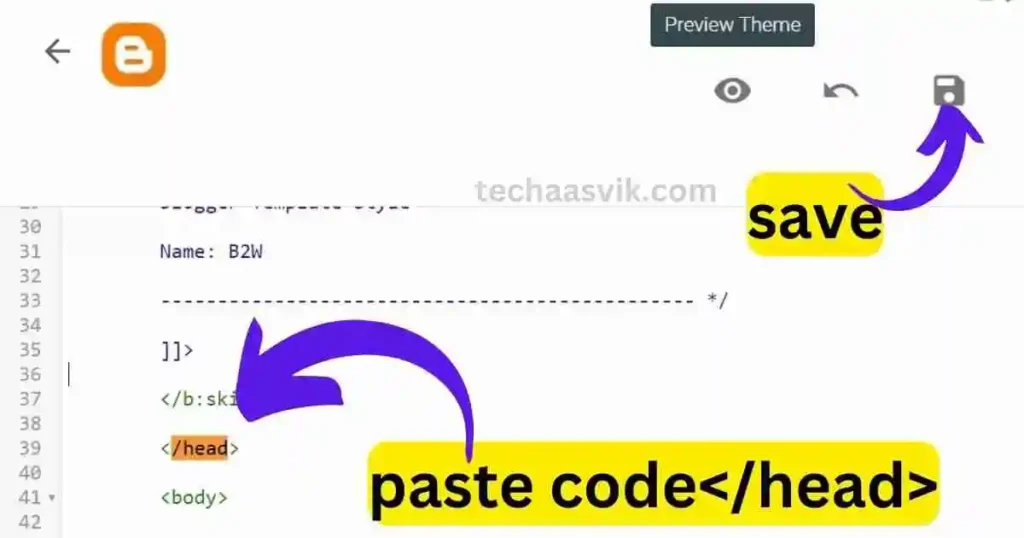
- अब जो कोड आपने कॉपी किया हुआ है उसे इसके </head> Just पहले Paste करें।
- अब Save पर क्लिक करें।
For Mobile:-
- अपने मोबाइल Browser में Desktop View को On कर लें।
- अपने मोबाइल से Blogger के डैशबोर्ड में आकर Theme में Edit Html Open पर क्लिक कर लें।
- अब Right up Corner में 3 डॉट पर जाएँ और Find in Page पर क्लिक करें।
- अब आप सर्च में इसे टाइप करें </head> यह Highlight हो जाएगा इसे खोज लेना है।
- अब जो Code कॉपी किया हुआ है उसे कॉपी करके इसके </head> Just पहले Paste करें।
- अब Save पर क्लिक करें।
Step 3 –
अब आप टेलीग्राम से Toc code 2 को download कर लें और Automatic Table of Content बनाने के लिए इन बातों को पढ़ लें –
- पहले New Post को html View में Open कर लेना है।
- अब New पोस्ट में जहाँ पर भी Table of Contents दिखाना चाहते हैं। वहाँ क्लिक करके इस Toc Code 2 को Paste कर लेना है।
ध्यान दे:- जब भी आप कोई New Post अपने ब्लॉग में लिखेंगे तो यह कोड लगाना होगा।
2. Table of Contents Generated by Website
Table of Contents बनाने के लिए अगर आप कोई Website Search करेंगे तो आपको बोहोत सारी Websites मिल जाएँगी। लेकिन कोई अच्छी Websites ढूंडने में आपका बहुत सारा Time Waste हो जाएगा। हम आपको एक Table of contents Generator के बारे में बतायेंगे जिसे हमने खुद इस्तेमाल किया है। इससे आप आसानी से अपने According Customize करके एक बढ़िया सी Table of Contents (Toc Full Form) बना सकते हैं। Website पर भी आप दो तरीको से Table of Contents बना सकते हैं।
Step 1 –
- सबसे पहले आपको इस Website पर चले जाना है। jadepuma.com
- अब आपके सामने यह Website Open हो जाएगी।
Step 2 –
- अब आपको वेबसाइट के Menu में Tools पर जाना है।
- अब Tools में Table of Content Generator पर क्लिक करना है।
- इसके बाद आपके सामने यह शानदार Tool Open हो जाएगा।
1st Method-
- सबसे पहले आपको आपने Blog को Open कर लेना है।
- अब आपको जिस Post का Table of Content Create करना है उस पोस्ट का Link कॉपी कर लीजिए।
- अब Tool में आकर Link Box में Paste कर दीजिए।
- अब आप अपनी पोस्ट का Title कॉपी कर लीजिए और नीचे टाइटल बॉक्स में Paste कर दीजिए।
नोट:- बस अब Complete हो गया सारा काम लेकिन अगर TOC को थोडा Stylish और Professional Look देना चाहते हो तो ये Steps भी देखिये -
- Border Style को Solid पर सेट करें।
- Border Width को 5-8 पर सेट करें।
- Border Colour को अपने अनुसार चुन लें ज्यादा Dark Colour न लगायें।
- Background Colour भी Light ही रखें।
- अब आप अपने अनुसार Headings Size सेलेक्ट कर सकते हैं, मैं Suggest करूँगा Default रखें।
Final Step –
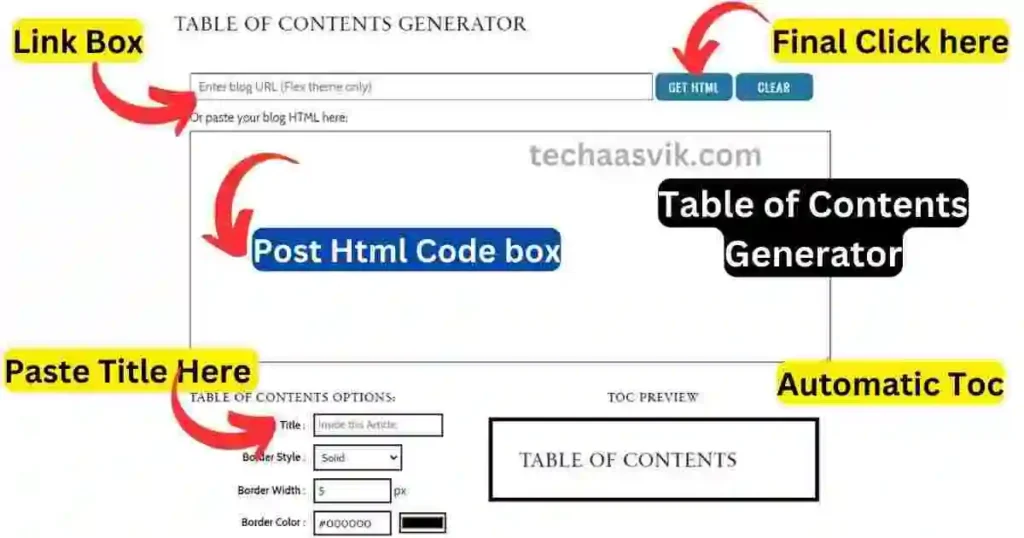
- अब आप उपर Get Html का आप्शन दिख रहा होगा उस पर क्लिक करें।
- अब थोडा नीचे आना है और Output Box से Coding को कॉपी कर लेना है।
- अब अपने ब्लॉग को Open कर लेना है और अपनी पोस्ट Open करें।
- पोस्ट के Html View को खोल लें।
- अब जहाँ पर आपका पहला Paragraph खत्म हो रहा है वहाँ क्लिक करें और उस कोड को Paste करें।
- बधाई हो – आपकी Table of Content बन गयी है।
2nd Method-
- सबसे पहले आपको आपने Blog को Open कर लेना है।
- अब आपको जिस Post में Toc लगाना है, उस पोस्ट के Html View को Open करना है।
- अब पोस्ट के Html code को कॉपी कर लेना है।
- अब Tool में आकर Html Box में Paste कर लेना है।
- अब आप अपनी पोस्ट का Title कॉपी कर लीजिए और नीचे टाइटल बॉक्स में Paste कर दीजिए।
Final Step –
- अब आपको ऊपर Get html का Option दिख रहा होगा उस पर क्लिक करें
- अब नीचे आना है और Output Box से Coding को कॉपी कर लेना है
- अब अपने ब्लॉग को Open कर लेना है और अपनी पोस्ट Open करें
- पोस्ट के html View को खोल लें
- अब जहाँ पर आपका पहला Paragraph समाप्त हो रहा है वहाँ क्लिक करें
- अब यहाँ उस कोड को Paste करें
- बधाई हो- आपकी Table of Content बन गयी है
WordPress में Toc कैसे Add करें: 2023 में
WordPress पर Table of contents बनाने के लिए आपको एक Plugin की ज़रूरत होगी। आप उस Plugin की सहायता से अपने आर्टिकल में Table of Contents आसानी से बना सकते हैं। आपको WordPress में Plugin को कैसे Install करना है, उसके Steps नीचे बताएं गए हैं:-
- सबसे पहले आपको अपने WordPress के Dashboard को Open करना है।
- इसके बाद आपको सबसे नीचे Plugin के Option पर Click करना है।
- अब आपको Add New पर Click करना है,
- अब Search Box में Easy Table of Contents नाम की इस Plugin को लिखकर Search करना है और Install करना है।
- अब Install करने के बाद उस Plugin को Activate करना है।
- Plugin में आपको एक छोटी सी Setting करनी है। आपको वापस Plugin के Dashboard को Open करना है।
- अब आप इस Plugin की Settings को Open करना है।
अगर नहीं जानते Settings का Option कहां मिलेगा तब – जो आपने अभी Plugin Install की है उसे ढूंढना है और उसके बिलकुल ठीक नीचे कई सारे Option दिए होंगे आपको सिंपल Setting के Option पर Click करना है।
- आपको ऊपर की दी गई किसी भी Settings को नहीं छेड़ना है।
- आपको थोड़ा नीचे Position का Option देखने को मिलेगा। थोड़ा नीचे Scroll करने पर ये Option मिल जायेगा।
- आपको इसके ठीक सामने एक बॉक्स दिखाई देगा वहां अब आपको After first Paragraph वाले Option को Select करना है।
- अब इसके बाद Settings को Save कर करना है।
TOC को Customized कैसे करें
अगर आप WordPress की Plugin का Use कर रहे हैं तो आपको उसमें बोहोत सारी Settings मिल जाती है। .जैसे आप Table of Contents की Theme Change कर सकते हैं, उनके Colours और Background Colour को अपने According Change कर सकते हैं।
- आपको अपने WordPress के Dashboard को Open करना है।
- आपको इसमें Plugin के Option पर Click करना है।
- अब आपको Easy Table of Contents इस Plugin की Settings को Open करना है।
- आपको नीचे Theme Option दिखाई देगा।
- आप Toc की Theme को Change कर सकते हैं।
- Custom Theme दिया हुआ है इसमें आप Background Colour Select कर सकते हैं।
- Border Colour Select कर सकते हैं।
- Title Colour वो भी आप अपनी पसंद का कर सकते हैं। इनके अलावा आपको Customize करने के और भी कई Option मिल जाएंगे।
- अब Settings को Save करना है।
आज हमने आपको इस आर्टिकल में ब्लॉगर में Table of Contents क्या है, क्या Toc से User Experience बढ़ता है, Blogger में दो तरीकों से Toc कैसे लगाएं और Toc को Customized करने के बारे में बताया है।
अगर आपको इस आर्टिकल से संबंधित कोई भी प्रश्न पूछना हो तो आप Comment करके पूछ सकते हैं। हमारा Telegram Group Join करें। धन्यवाद राधे राधे।
FAQs
Blogger में automatic toc लगाने के लिए अपने blogger डैशबोर्ड में theme के edit html में जाकर आपको table of content का कोड paste करना होगा | मैंने इसके बार में उपर आर्टिकल में बताया है कि आप कोड कैसे और कहाँ से इस्तेमाल कर सकते हैं |